 |
Keewano Unity SDK
|
|
Keewano Unity SDK
|
In addition to automatically collected events, it's recommended to add custom events to help Keewano AI Agents to better understand your gameplay and user behavior patterns specific to your product.
Good news: Unlike traditional analytics, you don't need to repeat context (level, difficulty, user_id) on every event. After ReportLevelStart(15), any ReportEnemyKilled("Orc") is automatically linked to level 15:
| Traditional Analytics | Keewano |
|---|---|
// Game level start
SendEvent("level_start", new {
game_level = 15,
difficulty = "hard",
user_id = "abc123",
device = "iPhone13",
session = "sess_456"
});
| // Level start - context set once
KeewanoSDK.ReportLevelStart(15);
KeewanoSDK.ReportDifficultySet("hard");
Definition KeewanoSDK.cs:18 |
// Enemy killed
SendEvent("enemy_killed", new {
enemy = "Orc",
game_level = 15, // repeated
difficulty = "hard", // repeated
user_id = "abc123", // repeated
device = "iPhone13", // repeated
session = "sess_456" // repeated
});
| // Enemy killed - just the action
KeewanoSDK.ReportEnemyKilled("Orc");
|
// Chest opened
SendEvent("chest_opened", new {
chest_type = "Gold",
game_level = 15, // repeated
difficulty = "hard", // repeated
user_id = "abc123", // repeated
device = "iPhone13", // repeated
session = "sess_456" // repeated
});
| // Chest opened - just the action
KeewanoSDK.ReportChestOpened("Gold");
|
// Game level end
SendEvent("level_end", new {
game_level = 15, // repeated
difficulty = "hard", // repeated
user_id = "abc123", // repeated
device = "iPhone13", // repeated
session = "sess_456" // repeated
});
| // Level end
KeewanoSDK.ReportLevelEnd(15);
|
To add a custom event, open the Keewano Custom Event Editor by accessing Keewano > Custom Event Editor menu item.
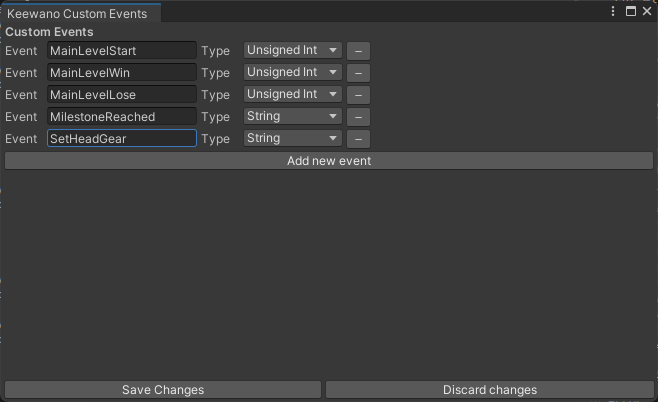
In the Custom Event Editor you can add new events and their types.
After adding or editing custom, save the changes. Custom events are added to the KeewanoSDK class.
The library will create a new folder called Assets/KeewanoCustomEvents, please add it with all its content to your source control, as it contains definitions of the custom events from which the KeewanoSDK methods will be generated.
String parameters are limited to 255 characters and will be trimmed if longer. Empty or null strings will skip the event.
 1.16.1